The ACETECH AC6000 MKIII Chronograph is a powerful and easy-to-use
device
designed to measure the velocity of BB pellets fired from airsoft guns.
Suitable for use with 4.5mm to 9mm BB pellets, this unit has a full-color display, allowing users to
monitor their firing data easily. The LCD-colored display
provides clear
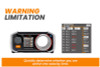
and accurate readings, and the velocity limit warning helps ensure user
safety
by alerting them when the velocity exceeds predefined safety limits. The
built-in tripod screw also makes it easy to mount and position the
chronograph
for optimal use.
The ACETECH AC6000 MKIII
Chronograph offers fast and accurate readings, making it an ideal choice
for airsoft
enthusiasts looking to improve their performance. While batteries are
not
included, this device is easy to set up and use, making it an excellent
choice
for both beginners and experienced users alike. Whether you are looking
to check your airsoft rifle's performance or simply monitor your firing
data, the
ACETECH AC6000 MKIII Chronograph is a reliable and effective tool to
help
you achieve your goals.
This chronograph can be powered by either AA batteries or by plugging into a power source via the USB cable, no batteries will be shipped due to IATA regulations.
Check out more Original Parts & Training
Includes:
- x1 ACETECH AC6000 MKIII Chronograph
- x1 User Manual